How to automate your CI/CD pipeline with GitHub Pages and GitHub Actions
Are you one of the 73 million developers who build, ship, and maintain their software on GitHub? Most tech companies now use it in their workflows. In this blog, I’ll show you how to use two features to automate your CI/CD pipeline: GitHub Pages and GitHub Actions.
What are GitHub Pages?
GitHub Pages provide a static site-hosting service that takes HTML, CSS, and JavaScript files straight from a repository on GitHub. GitHub Pages allows you to publish website code live on the internet. It has several valuable features, with some restrictions:
GitHub Pages sites are publicly available on the internet by default.
Other options include hosting your site on GitHub’s github.io domain or your custom domain.
You may use private repositories, but only when it is an organization’s repository. You will need to upgrade to turn on GitHub Pages for private repositories.
GitHub Pages does not work with sites that use a server-side language. It cannot execute languages like Ruby, Python, or PHP. As I mentioned earlier, GitHub Pages only works with static websites containing HTML, CSS, and JavaScript files.
Various customizable themes are available for your GitHub data pages.
As an option, GitHub Pages will run the files through a build process and publish a website. This feature is the focus of my blog.
These are great features, but there are some usage limitations:
Published GitHub Pages sites may be no larger than 1GB.
GitHub Pages sites have a soft bandwidth limit of 100GB per month.
GitHub Pages sites have a soft limit of 10 builds per hour.
There are a few private subscription uses, which are prohibited for use in the public domain. Public domain GitHub Pages may not be used for online business, e-commerce sites, or commercial transactions
What are GitHub Actions?
GitHub Actions allow you to automate, customize, and execute your software development workflows for CI/CD right in your repository. GitHub Actions has several components:
Workflows. Automated procedures triggered by an event to build, test, package, release, or deploy.
Events. Trigger the workflow (commits or push requests).
Jobs. A set of steps that execute on the same runner. Jobs can be sequential, parallel, or dependent.
Steps. Run commands in a job (either an action or a shell command) and share data with other steps.
Actions. Standalone commands that are combined into steps to create a job. You can create actions or use actions created by the GitHub community, but this must be included in a step.
Runners. A server that has the GitHub Actions runner application installed. You can use a runner hosted by GitHub or host your own. A runner reports the progress, logs, and results back to GitHub.
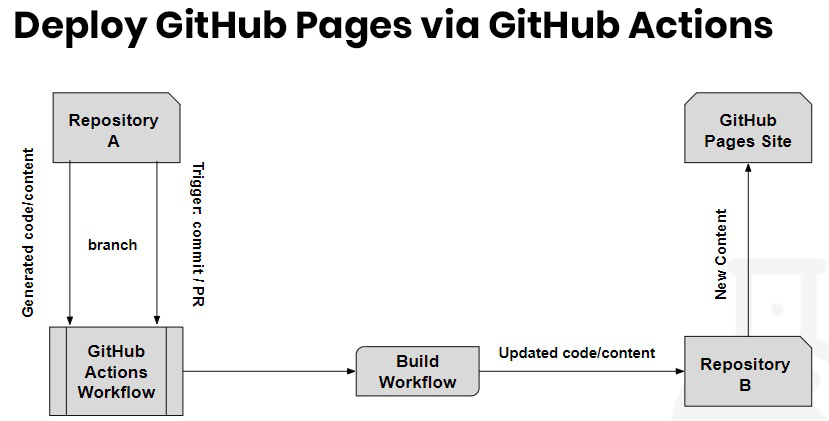
The following diagram is a use case I will use in my demonstration:
Step-by-step tutorial
In the tutorial video below, I’ll demonstrate how to deploy GitHub Pages and GitHub Actions.
Need help with GitHub, CI/CD, or DevOps on AWS? The nClouds team is here to help with that and all your AWS infrastructure requirements.
nClouds Named a 2024 Geography and Global AWS Partner Award Finalist for MSP and SaaS Categories
nClouds recognized as MSP Partner of the Year and SaaS SI Partner of the Year finalist, ranking highly among the many AWS Partners around...
Read MoreRead More
Blog Post
Common Challenges in Cloud Security and Compliance (And How to Overcome Them)
As businesses increasingly migrate to cloud environments, the need for robust security and compliance measures has never been more critical. However, achieving and maintaining...
Read MoreRead More
Blog Post
nClouds Takes Part in Panel Discussing Technology Transformation Strategies
Industry experts gathered for a highly anticipated panel focusing on “Transforming for Success: Technical Optimization Strategies to Enhance Portfolio Company Valuation.”
Read MoreRead More
Blog Post
Navigating VMware Price Hikes: Why Migrating to AWS Could Be Your Best Option
The recent acquisition of VMware by Broadcom has led to a turbulent period for many organizations, with price hikes leaving customers in difficult positions.

 All Posts